Back to work
Mobile App
Travel
End-to-End
TripSaver
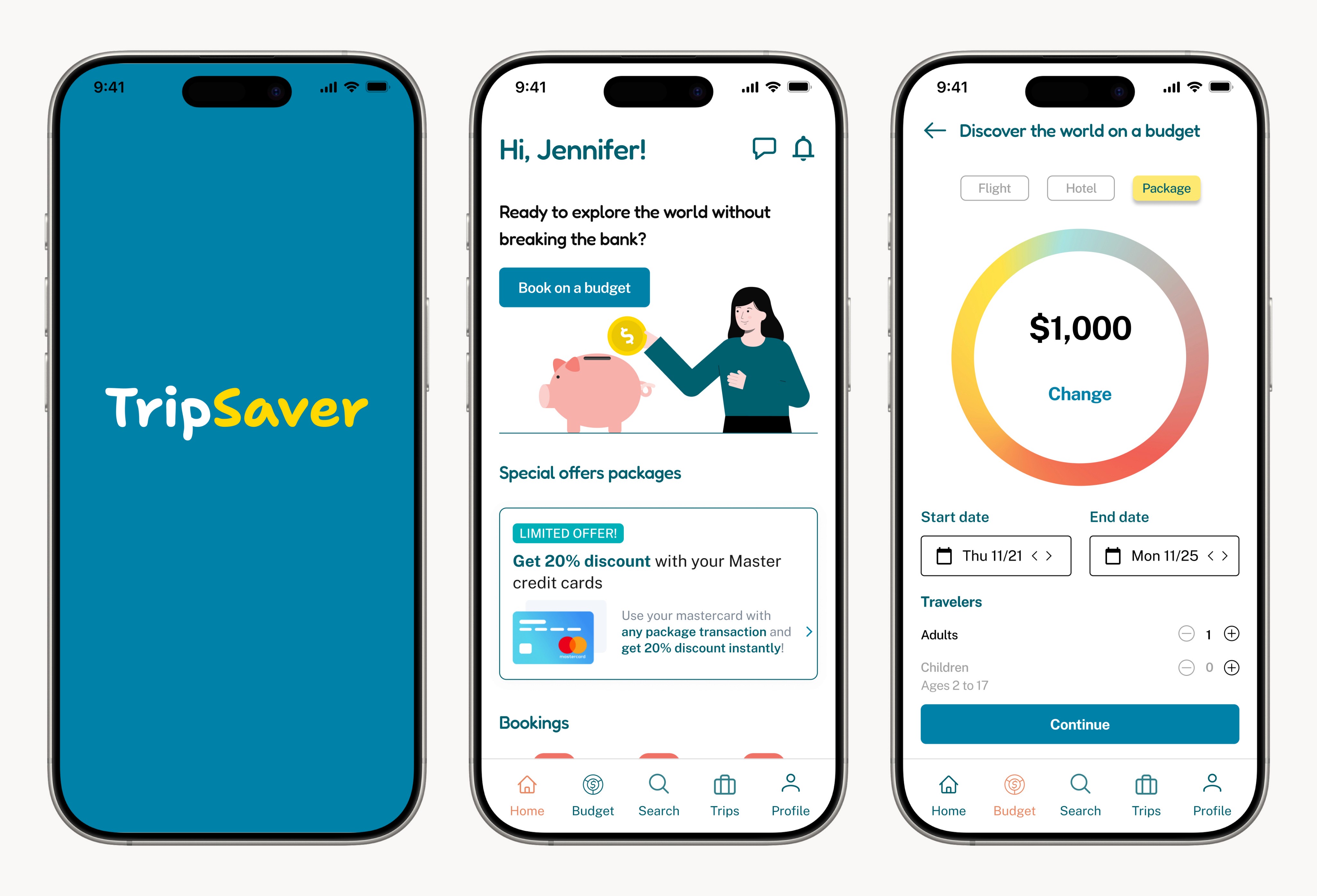
A travel booking app designed for budget-conscious travelers who want to explore without the anxiety of overspending.
Jump to designs
Role
UX/UI Designer
Timeline
7 weeks
Tools
Figma, Maze, Miro
Platform
iOS, Android
Team
Solo designer
The Problem
Traditional travel booking platforms often provide a wide range of options but do not help users stay within their budget. Many travelers struggle to balance the cost of flights, accommodations trying to have a memorable vacation experience. This leads to either overspending or the inability to fully plan their trip due to budget constraints.
The Goal
Design a mobile app that helps travelers set a realistic budget upfront and discover trips that fit within it - combining flights, hotels, and packages into one clear view so users can plan confidently without the fear of overspending.

Competitor Analysis
I examined three major travel booking platforms - Booking, Expedia, and TripAdvisor - to understand common patterns, strengths, weaknesses, and unmet user needs across the travel market.
Booking
Strengths
Massive accommodation inventory with real-time availability
Flexible cancellation policies and "pay at property" options
Strong reviews and verified guest ratings
Weaknesses
Dense filter interfaces create cognitive overload on mobile
No integrated budget tracking across flights and hotels
Expedia
Strengths
Bundle deals combining flights, hotels, and activities
Loyalty rewards program with member-only pricing
Wide range of travel products in one platform
Weaknesses
Overwhelming filter systems that don't prioritize budget constraints
Final pricing often differs from initial search results
TripAdvisor
Strengths
Extensive user-generated reviews and local recommendations
Strong destination discovery through community content
Price comparison across multiple booking providers
Weaknesses
Redirects to third-party sites for booking - fragmented experience
Information overload reduces clarity around total trip cost
Opportunities Identified
01
Simplified comparison
Replace dense filter interfaces with streamlined comparison systems that surface the most relevant options based on budget, reducing decision fatigue.
02
Context-aware recommendations
Move beyond overwhelming filter systems to offer guided, insight-driven experiences that prioritize clarity over raw listings.
03
Clearer information hierarchy
Reduce cognitive load by prioritizing essential information — total cost, key amenities, and deal quality — over exhaustive detail.
The market is saturated with options, but no platform truly helps users stay within budget from start to finish.
User Research
I conducted remote interviews with 5 target users - budget-conscious travelers, young professionals, and frequent travelers - to understand their booking habits, pain points, and budget management strategies.
Pain Points
01
Budget management anxiety
Unexpected costs like last-minute fees aren't accounted for upfront. Users manually adjust budgets on-the-fly, creating stress and uncertainty throughout the entire planning process.
02
Decision fatigue from app overload
Too much information makes it hard to balance quality vs. cost. Users bounce between multiple apps comparing options, leading to longer planning times and worse decisions.
03
Hidden fees erode trust
Vague pricing details and surprise charges at checkout make users feel deceived. They can't see a true total cost before committing, which leads to booking abandonment or overspending.
Opportunities from Research
Flexible budgeting feature
A tool that adjusts based on actual spending, helping users manage unexpected costs without derailing their trip plans.
Budget-quality balance
A feature that balances budget constraints with quality expectations, so users don't have to sacrifice experience for price.
Cost estimator with breakdowns
A cost projection tool that shows total trip expenses with detailed breakdowns — eliminating hidden fees and surprise charges.

Key Research Findings
From the research, I developed two user personas and mapped the core user flow to ensure the design addresses real needs and behaviors.
User Personas
Two primary personas emerged representing budget-conscious travelers with different planning styles and motivations.
Emma, 26
Junior Analyst, Chicago
"I need to know exactly what I'm spending before I commit."
Goals
Find affordable options within a fixed budget. See all costs upfront. Plan quickly without comparing multiple apps.
Frustrations
Hidden fees at checkout. Difficulty estimating total trip costs. Overwhelming options with no budget guidance.
Behavior
Plans on mobile during downtime. Sets strict budget limits before searching. Values transparency over luxury.
Marcus, 31
Product Manager, Austin
"I'm tired of apps that waste my time with irrelevant options."
Goals
Find the best deal fast for a specific destination. Compare total costs across dates. Book with confidence.
Frustrations
Prices changing between search and checkout. Too many results with no clear winner. Juggling multiple platforms.
Behavior
Has specific destinations in mind. Travels frequently for work and personal. Values efficiency and speed.
User Flow
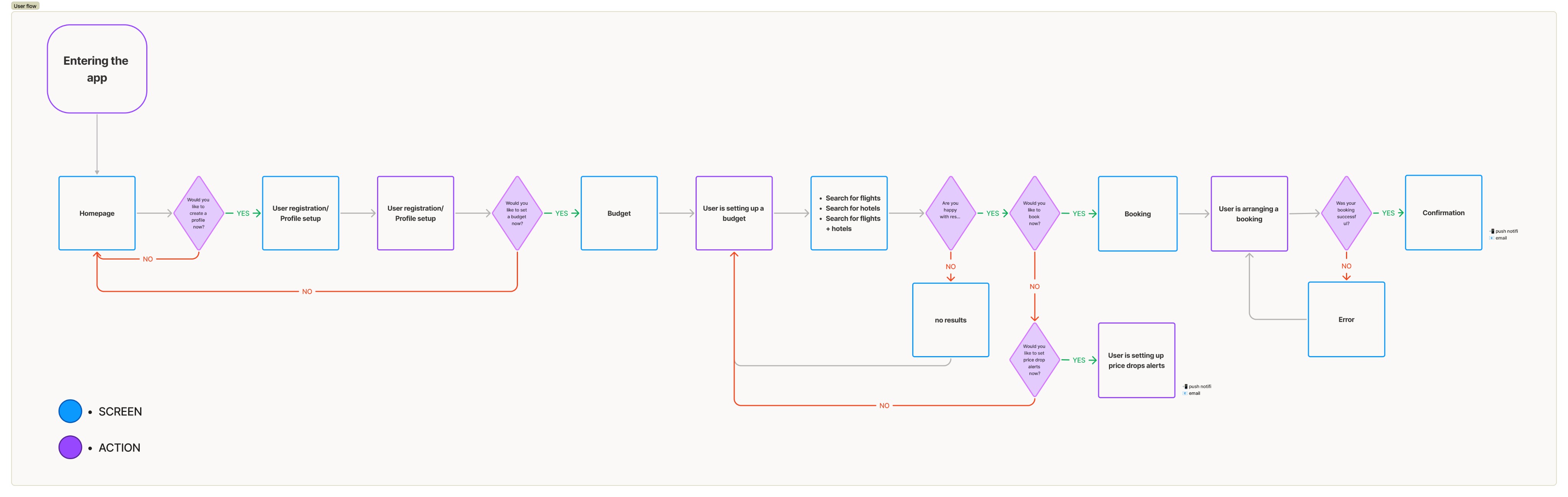
I mapped the user flow, showing the sequential steps for completing key tasks and ensuring intuitive navigation throughout the app.
1
Set Budget
Define total trip budget upfront
2
Explore Options
Browse trips that fit within budget
3
Review Details
See full cost breakdown with no hidden fees
4
Book & Confirm
Complete booking with transparent pricing
Navigation & Structure
I created a sitemap to establish clear relationships between pages and features, ensuring a logical content architecture that supports budget-first navigation.
Set a budget
My budget
Flight
Hotels
Flight + hotel
packages
Upcoming trips
Past trips
Account
Rewards & Wallet
Saved
TripSaver App
Budget tools
Search
Trips
Profile
Design Decision
Budget setup is a primary navigation item, not buried in filters. This ensures every user journey starts with a clear spending limit, which research showed was the top priority for our target users.

User Journey Map
I mapped the end-to-end user journey to identify emotional highs and lows and design for the moments that matter most - from initial discovery through booking confirmation.
Stage
Discovery
Exploration
Decision
Booking
Confirmation
Actions
Opens app, discovers
budget-first approach
Sets budget, browses matching
trips, compares options
Reviews cost breakdown,
evaluates best options
Selects trip, completes payment
with transparent pricing
Receives confirmation with
full itinerary details
Thinking
"Can I actually plan a trip
within my budget?"
"These options actually fit
what I can spend"
"I can see exactly where
my money goes"
"No surprise fees -
this is the real price"
"That was so much easier
than other apps"
Emotion
🤔
😊
😄
🤩
😍
Opportunity
Curiosity - first impression of budget-first model
Cautious optimism -
growing confidence in options
Relief - transparency builds
trust
Confidence — no hidden
costs at checkout
Delight - simplified process
builds loyalty
Key Insight
The emotional arc moves from curiosity to relief - a deliberate contrast with competitor journeys where anxiety peaks at checkout. By front-loading budget transparency, the emotional curve stays positive throughout.
Idea Validation: Early Concept Exploration
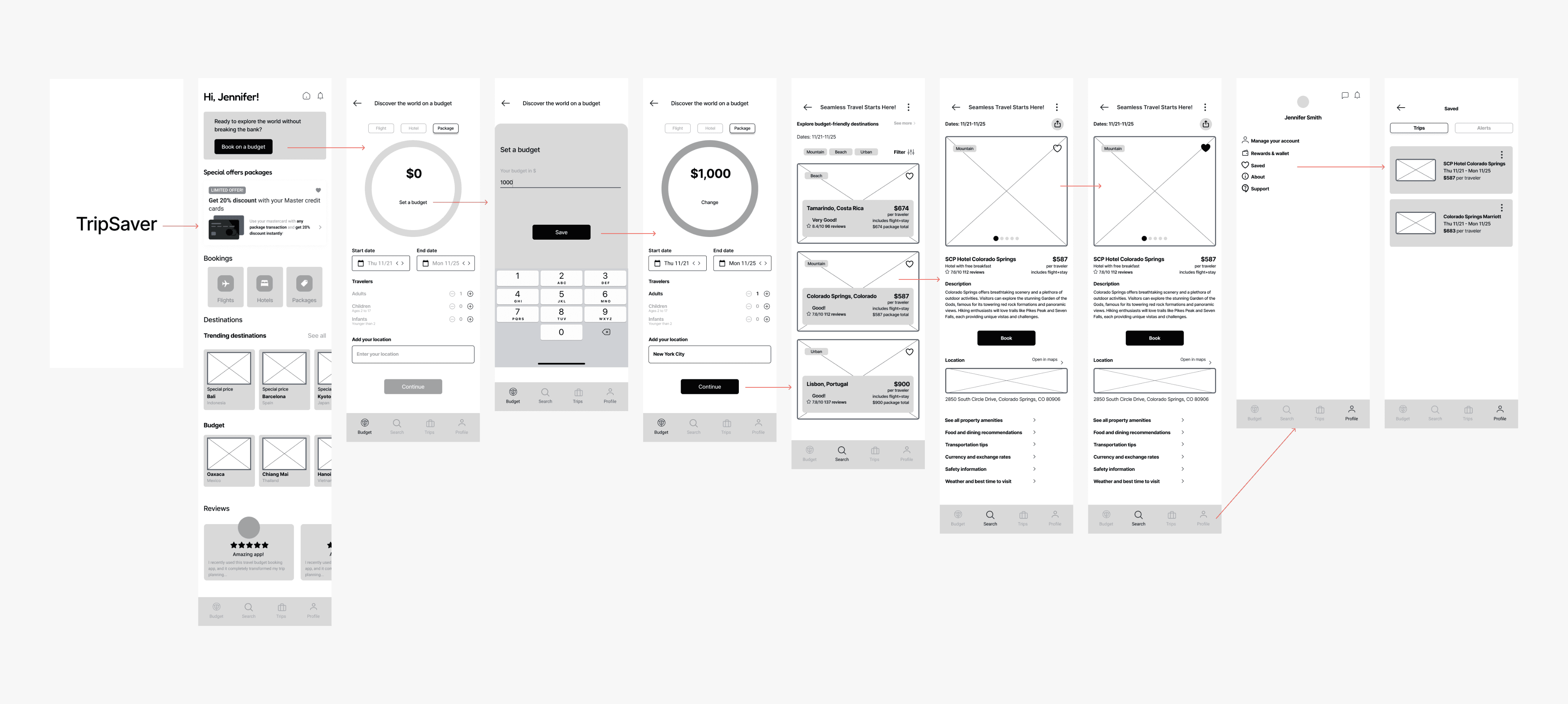
I created low-fidelity wireframes to rapidly explore layout and functionality without visual details, mapping key screens and focusing on structural solutions before investing in visual design.
Wireframe
Homepage
Wireframe
Budget Setup
Wireframe
Trip Flow
Wireframe
Booking Confirmation
Design Decision
Low-fidelity wireframes allowed rapid exploration of structural solutions before committing to visual design. This approach saved time and ensured the layout served user needs before aesthetics were applied.

Branding
TripSaver's brand identity combines trust, warmth, and the excitement of travel discovery. The visual language was carefully crafted to feel approachable while communicating reliability.
Logo & Mark
TripSaver
Soft, rounded wordmark for warmth and approachability, reinforcing the travel theme without being literal.
Color Palette
#0081A7
#FFD700
#F16055
Blue conveys trust and reliability. Yellow captures the excitement of travel discovery. Red adds energy and urgency to key actions.
Typography
Find your next adventure
Primary: Fredoka — Soft, rounded shapes that create a friendly, approachable tone. Used for headlines and display text.
Secondary: Public Sans — Modern, clean aesthetic with high legibility. Adds professionalism and clarity to body text and UI.
Usability Testing
I conducted usability testing to validate design decisions and identify areas for improvement. Testing focused on three key areas that directly impacted the core user experience.
95%
Budget tracking intuitiveness
Participants rated the budget feature as clear and intuitive. Real-time updates showing how each decision affected total trip costs gave users the transparency they were missing from other apps.
4.7/5
Travel options confidence
Users rated confidence in options at 4.7 out of 5. They appreciated the ability to explore multiple destinations within budget constraints without feeling overwhelmed by irrelevant results.
88%
Navigation satisfaction
88% of participants rated navigation as "easy" or "very easy." Users moved through budget-setting to trip review without confusion, completing core tasks in under 2 minutes on average.
Key Insight
The budget-first approach — the most unconventional design decision — tested as the strongest feature. Users didn't just find it useful; they questioned why other travel apps don't work this way.

Design Iterations
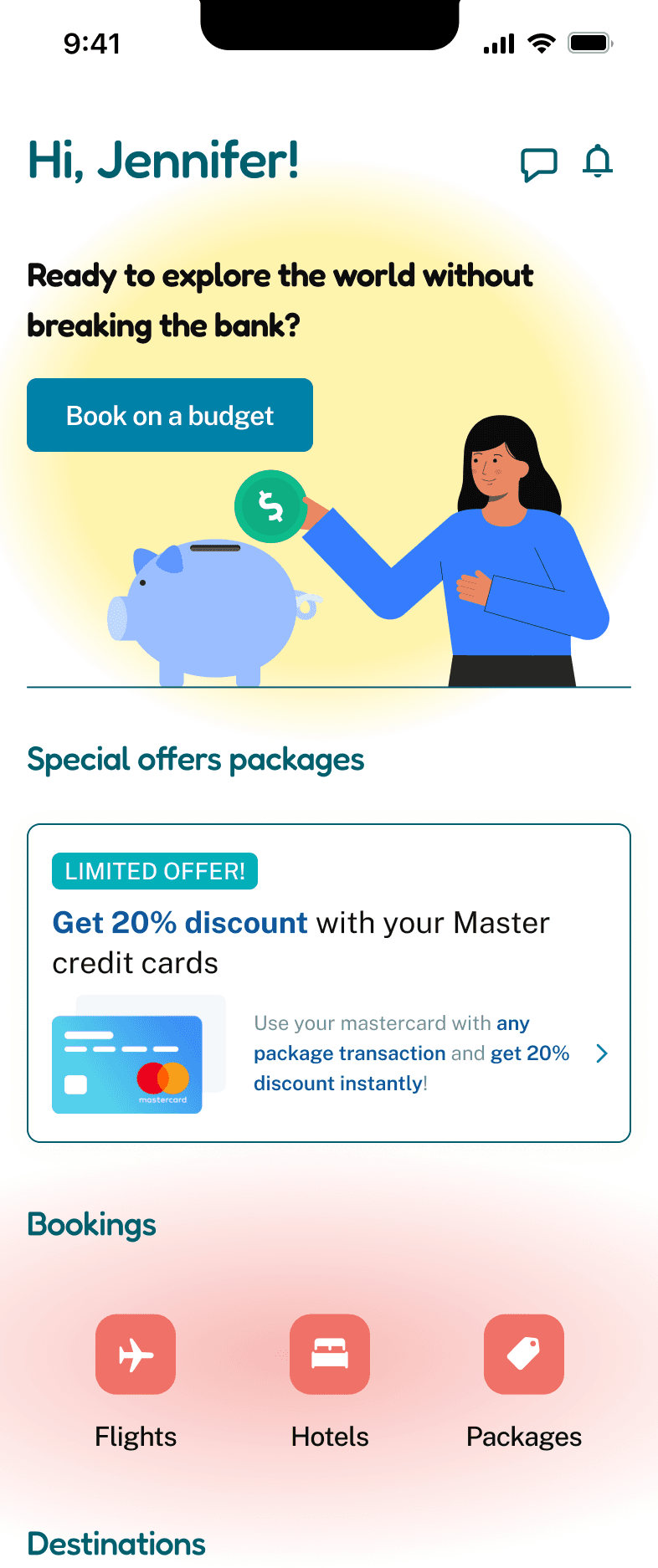
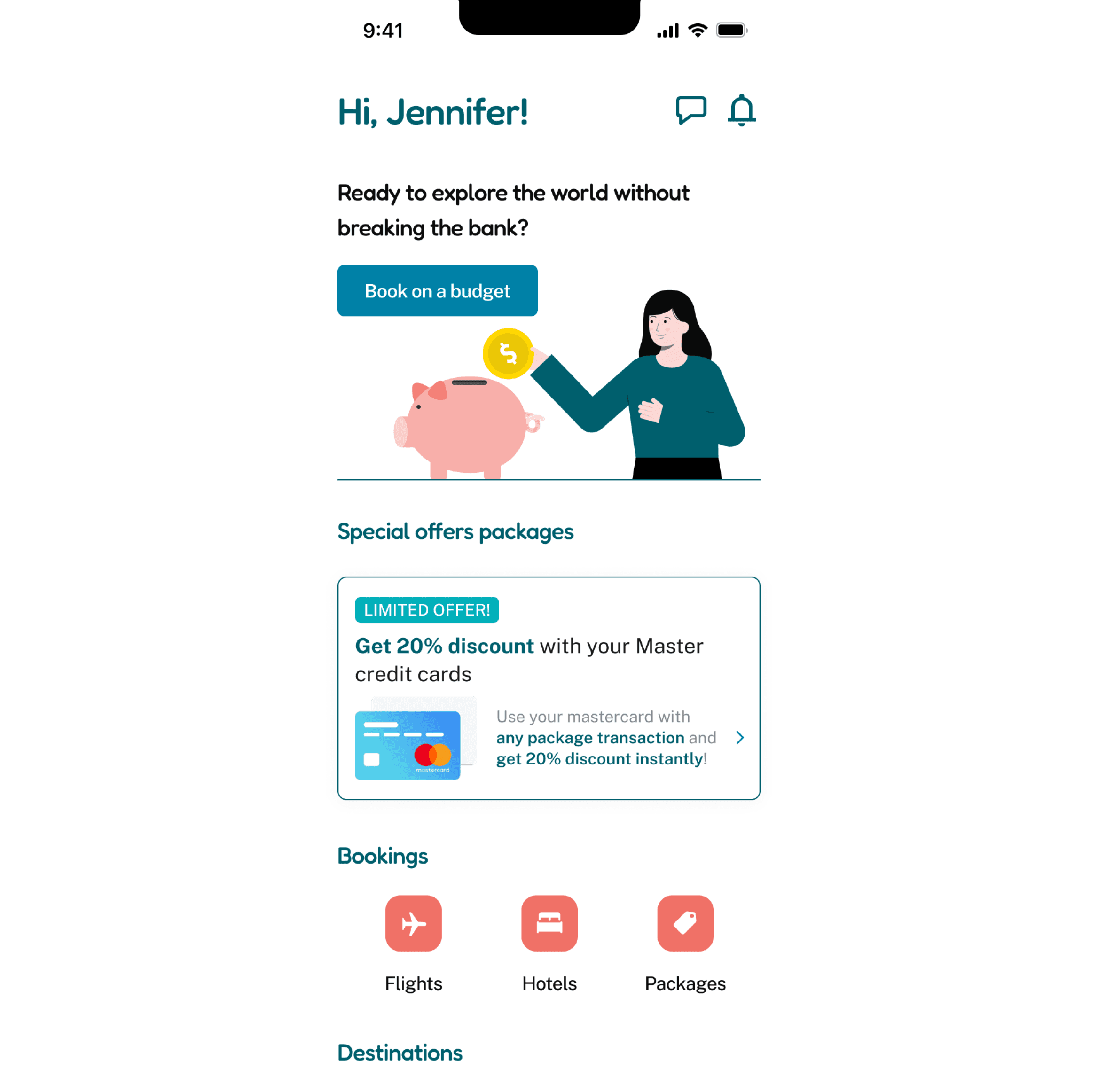
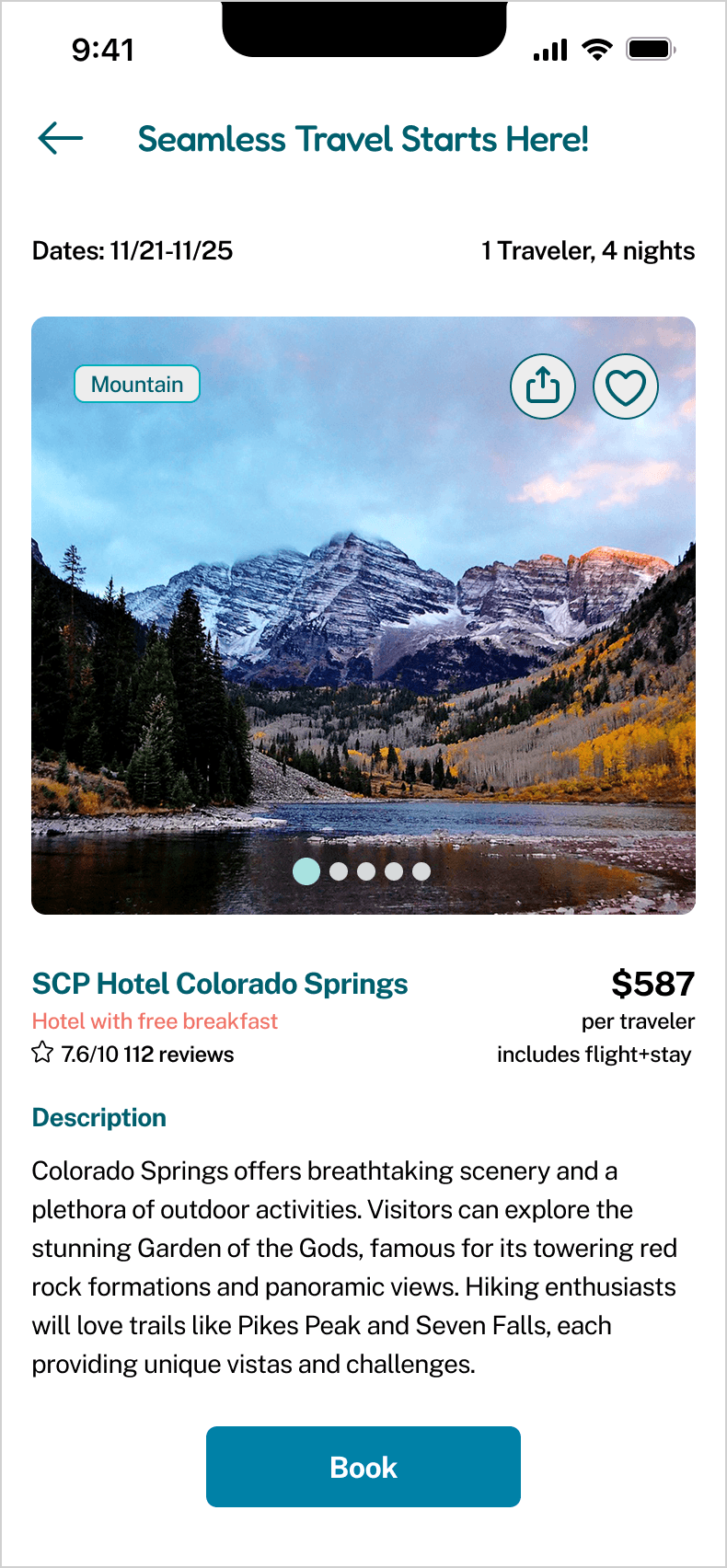
Based on usability testing feedback, I made significant iterations to improve clarity, trust, and task completion. Here are the key before-and-after changes.
The background was made clear, and the illustration colors were updated to match the app’s color palette.
The text size was increased, the CTA button was enlarged, and the information displayed was updated.
Homepage
Trip Information
Before

Price was buried below the image and description. No cost breakdown visible. Users scrolled past without registering the total.
After
Total price displayed prominently with an "all fees included" badge. Tappable cost breakdown builds trust. Budget impact indicator shows remaining budget.
Before
Price was buried below the image and description. No cost breakdown visible. Users scrolled past without registering the total.
After
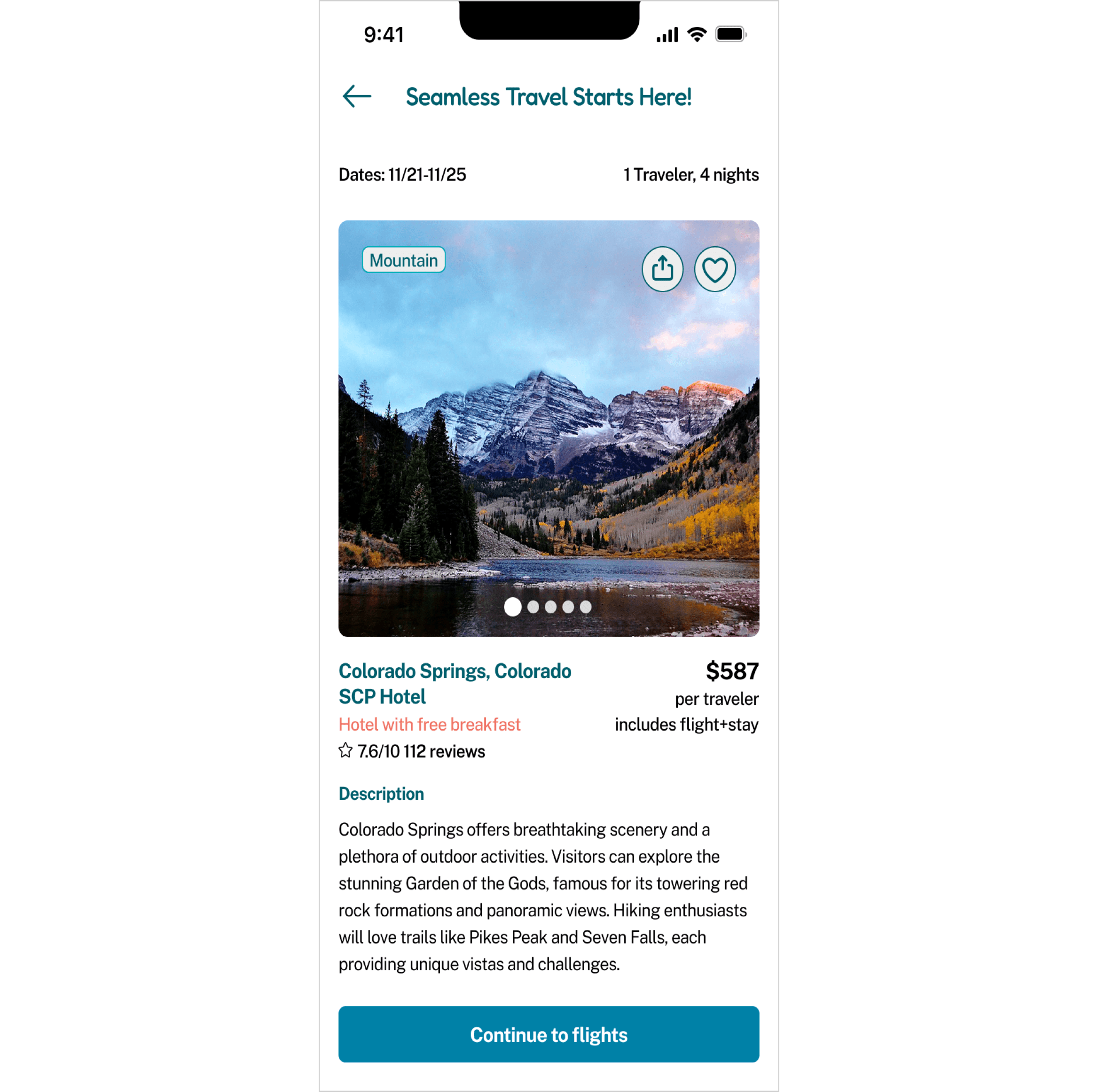
Total price displayed prominently with an "all fees included" badge. Tappable cost breakdown builds trust. Budget impact indicator shows remaining budget.

Learnings & Opportunities
This project reinforced key principles about designing for budget-conscious users and revealed areas for future exploration.
What I Learned
01
Transparency is the feature
The most impactful design decision wasn't a clever interaction — it was showing the real price upfront. Trust is built through honesty in the data you present.
02
Budget-first flips the paradigm
Starting with "how much do you want to spend?" instead of "where do you want to go?" served most users better. Questioning the default interaction model led to the strongest differentiator.
03
Simplify decisions, not options
Users don't want fewer options — they want fewer decisions. Presenting curated results within a budget eliminated the cognitive load of comparing across platforms.
04
Test the core interaction first
The budget slider went through multiple iterations before landing on the final version. Tackling the hardest component early meant the rest of the design flowed naturally from it.
Future Opportunities
Group trip budgeting
Allow multiple users to set individual budgets and find trips that work for the whole group — a shared planning mode for friend groups and families.
AI-powered suggestions
Use past booking history and preferences to proactively suggest trips when prices drop into the user's typical budget range.
Travel savings integration
A micro-savings feature where users set a trip goal and automatically save toward it. When the balance hits the target, TripSaver surfaces matching trips.
Final Design & Prototype
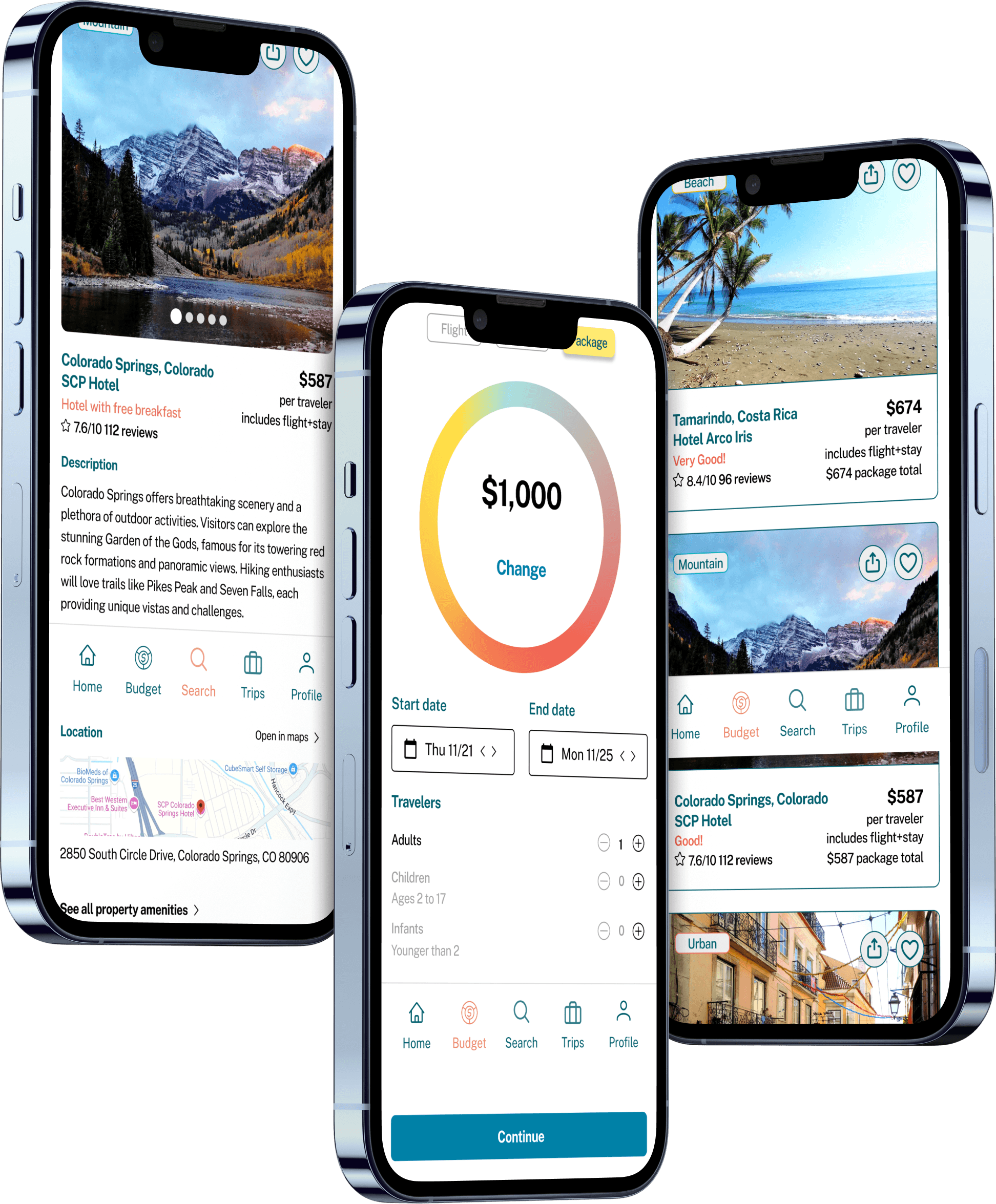
The final high-fidelity designs bring together all research insights, usability improvements, and brand identity into a polished product ready for development handoff.
Interactive Prototype
The prototype demonstrates the full user flow end-to-end — from budget setup through trip discovery to booking confirmation — with all micro-interactions and transitions.
Results
100%
Budget feature
clarity rating
High
User satisfaction
for navigation
0
Hidden fees
at checkout
Strong
Confidence in
travel options
NEXT PROJECT